I recently played with Adobe Voice and then showed it to my Leo, who has ASD and is a year 4 pupil.
Leo used it as a tool to complete his homework on Greek myths. Together we have played with a range of digital story telling tools both app and PC based, but I am taken aback by the features of Voice. It integrates picture, voice and clip art easily to make simple narrated stories.
Leo is someone who struggles with writing and his best work is when he creates on-screen. Though for him to be truly independent he needs something that will allow him to create and build very simply through easily learned processes. Is it too much to ask that the output looks good too?
This is where Voice ticks all the boxes.
And with all this it also outputs a portable and embeddable format, it doesn’t just stay within the app or reduce to a mere PDF.
Here then is Leo’s first go at both a Greek myth and Adobe voice.
Note – Voice embeds in most websites, but as this blog is wordpress.com it does not allow the embedding of iframe content, but other blogs would not be as fussy.
Anyway click on the beast below..
This versatile app could be used very easily in class for cross curricular ICT, to support SEN pupils or as resource for units in Switched On Computing. For example, 3.5 – We are Communicators or 1.5 We are Story Tellers.
Much has been tweeted and Facebooked this week about the untimely passing of Bev Evans. We have lost a friend and our timelines and news feeds are now much quieter and duller due to her silence.
For the educational ICT and SEN online communities Bev was a dependable constant. Over the last ten years as I moved from ICT teacher to advisory work to 2SimpleAnt and into parenting Autistic children and Senco, she could always share something new or bring advice from her experience.
She was one of the first teachers I knew who shared and advised online. In the early days of the TES forum she used to share her SEN resources and Doctor Who themed ideas with me. Back then you’d have to wait a few minutes for replies to appear, but her experience in special schools and as a mum meant she had a wealth of ideas, knowledge and above all empathy and enthusiasm. So much of what is written about being a parent of a child with Autism of other special need is schmaltzy or confrontational. Bev did not have time for this, she pushed all her energies into her mouse and made a difference.
Bev had an agenda, a passion and mission to tell us all about how tech could give voice and empowerment to those who had little or none of either of them. She discovered early on that technology could transform the experience of children with special needs. She tried, tested and contributed to the making of commercial SEN and ICT products, but most of the time she just made or adapted her own.
One of the most downloaded makers on the TES, she wasn’t in it for the prestige or self promotion. It was just what she did. I could go on but I want to leave space for one of my favourite Bev EVans talks, here at NAACE two years ago, she goes mostly unplugged to talk about the transformational power of technology. Here as on many other occasions she champions inclusion as more than just a word on a PowerPoint slide.
As a footnote, to my mind it would be fitting to see one of EdTech or SEN bodies to create or rebrand one of their awards as The Bev Evans Award. An award that would recognise excellence in the inclusive use of technology.
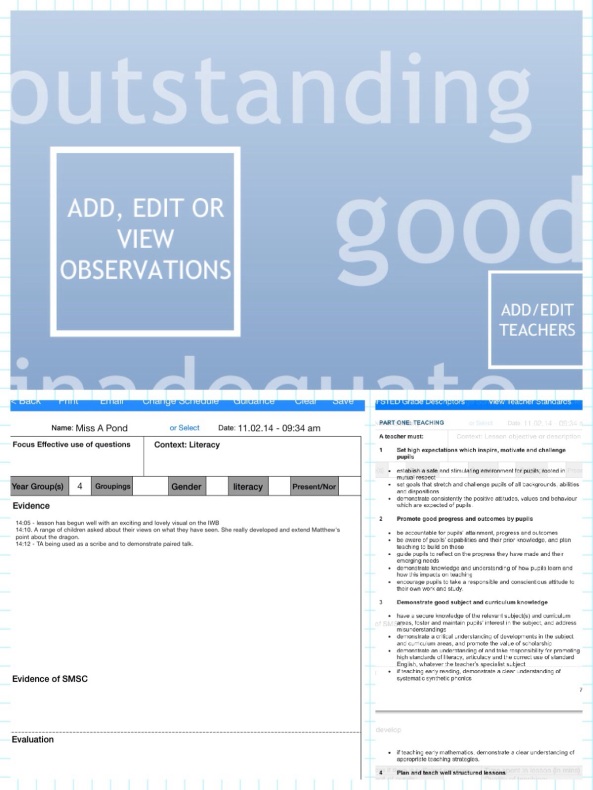
Some time ago a colleague and I were discussing some “what if apps”. By that, I mean we had a wish list of some apps that would make our job easier. We had been doing our round of observations of ITT students and class teachers and between us we used a mix of paper and pen or “typing it up in best”, along with various sheets listing Ofsted Criteria and Teaching Standards. My personal set up has been iPad with PDFs of Teaching Standards and the standard school observation form. Oh and a pen.
All this can get a bit fiddly and hence our “what ifs”, which ended with ” there was an app which let you just click on the Teaching Standards”. By which I think she meant something that allowed you to have everything you needed to do an observation in the same place/app.
This is why I Observed is such a useful app for a busy middle or senior leader. You have your observation form, which is adjustable and beats typing everything in notes or fiddling around trying to recreate the darn thing in Pages. You also get the Teaching Standards and OFSTED criteria to consult within the app itself.
I gave it a go, over the last two weeks and it is far from “requires improvement”. I also played with some other apps that have similar names or purport to do the same job. There are not many and all seem to require you to register with something or some one else first. Here is why I have begun to use I Observed in the style of lesson feedback:
Great to see:
Unlike other apps that do this job, you do not need to subscribe to an online service it is all in the app
Observations are exported as PDFs – most of my pen and paper reports, though great are hard to copy and paste into final reports.
Having the guidance at hand from OFSTED and the DFE Teaching Standards means you do not have to leave the app or ruffle through paper – it is all there for you.
The interface is simple and there is no learning curve with this app
The developer has also really listened to my feedback/suggestions and responded with updates and improvements. This attention to detail and attentive approach is rare and shows the team behind the app are about more than just the small charge at download stage.
The few, the proud, the “those with nothing better to do” among you probably know by now that I always begin my articles with a completely pointless introductory paragraph before I approach my obligatory plot summary. Not this time, folks. I’m reviewing
The Lego Movie
this week and I cannot postpone my excitement. I’m getting it out in the open right now:
The Lego Movie
is perfect. If you disagree with me, then you are wasting your time in reading this review. Go read a book. If you agree and desperately need your opinions validated by an unpaid internet movie critic, read on, dear friend. If you haven’t yet seen
The Lego Movie
and need a reason to do so, you’re in luck.
As an ICT Coordinator I used to attend the BETT Show with a different and perhaps naive head about me. I went like a DJ/toy collector looking for the next new thing. The experience of finding the new piece of software from 2Simple was akin to going to HMV or Woolworth to get the new records on Monday Morning
Except seeing new software was and is more than just completing a collection, it is not just another white felt tip bordered box on the shelf or icon on the server. You are looking with your lessons, schemes of work and just creative fun in mind. You should be thinking can I use this with my class and what will we do with it? How far can I push it and how far can I push them? But beyond this, you are thinking far beyond your own geeky application and more about the teachers who are reluctant ICT users, perhaps because they have limited training, they are scared that the children know more or they just don’t get it.
Products like 2Publish+, 2Control, 2Create a Story and (the zeitgeist busting title that hit before coding was hip) 2DIY excited me as they answered all of the above questions. They also offered ease of use and took just 20 or so minutes of less to demo and win over my teachers. Why and how they did this was due to their simplicity married with curriculum coverage. Beyond the rather obvious they must be simple because they were made by 2Simple argument, there was something deeper going on.
For a few years I joined the team at 2Simple and worked alongside and under Max Wainewright, the man behind anything that is creative, innovative and good in the 2Simple back catalogue. He is a man of great genius and vision, he found inspiration in everything from teacher blogs, Wired magazine, his experiences with his own children and his teaching background. He would meet regularly with ICT advisors and teachers and carry out informal research about the state of ICT and what teachers needed.
His office was a visual representation of his mind, drawings, mind maps , prototypes and lots of felt pens. This is how the best ideas came about, a discussion with colleagues would lead to scribbles with felts on piles of scrap paper. Within hours, Max would have bashed out a prototype and the building process of building a new product would begin. At this stage we’d offer further ideas and suggestions. These would be relentless recorded on a spreadsheet, this that were fixes or hampered functionality would be fixed in good time. Other “what if it did this?” type requests would be noted for consideration. The over-riding factor would be the fictional character of “Mrs Jones”, this was your standard teacher not your ICT guru who lived on Twitter. If she couldn’t use it to teach Year 2 on a wet Wednesday in the ICT suite then it wasn’t for us.
Sometime ago, Max left 2Simple and for a while he taught ICT lessons in a local primary. He brought his knowledge of programming, creativity and love of teaching to the question that many of us are still puzzling over. How do you marry coding, iPads and the ordinary primary class teacher? The result is Espresso Coding and I was privileged enough to view this with a live class last Summer, in an early Beta stage.
As with previous titles, it does not demand huge pre knowledge of IT and what’s more it will help you cover the breadth of the coding aspect of the new curriculum. From experience, your run of the mill Mrs Jones teacher will struggle with Scratch, Kodu or other tools, unless there is a good deal of hand holding. Espresso coding.
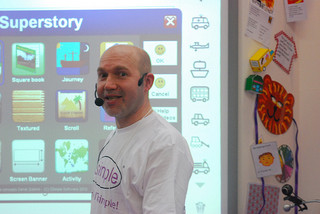
The image below sums up the spirit of both Max and Espresso Coding, in his hand you can see a PDA. The sharing of creations has always been important, except now it is on iPads. The menu of 2DIY shows a graduated approach that serves both teacher who can build up their knowledge and serves the curriculum too as units are built from EYFS upwards. The same is true for Espresso coding which builds from Year 1 unto the end of Key Stage 2.
I have been a teacher for 25 years, a Headteacher for 10 years and, at the age of 49, this much I know about…why we should never grade individual lessons again!
What is the Headteacher’s single most important responsibility? If you read the first four adverts for Headships in this week’s TES online Jobs section you’d think it was to gain an Outstanding OFSTED judgement:
This appointment represents a great opportunity for the right person to build on what has been achieved and to lead our committed and talented staff in pursuit of the school’s ambition to be nothing less than outstanding.
The Governors wish to appoint a committed Christian to lead our successful school, to sustain our inclusive Christian ethos and take us from ‘Good’ to ‘Outstanding’.
Due to the planned retirement of our Headteacher, the Governors, Staff and children are looking for an inspirational, visionary leader, with…





 curriculum coverage. Beyond the rather obvious they must be simple because they were made by 2Simple argument, there was something deeper going on.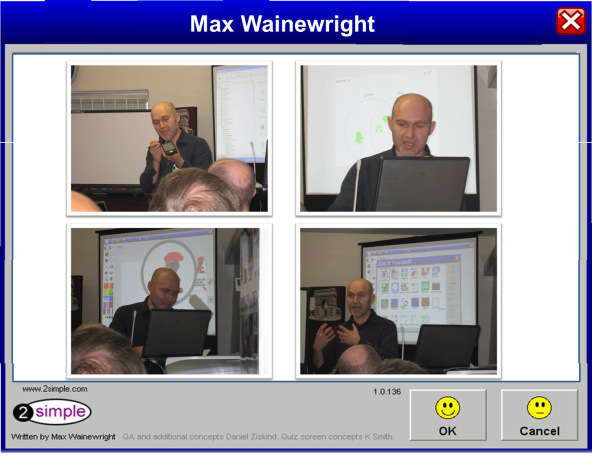

 Ant's ICT
